
Ergonomic office furniture for remote work is no longer a luxury; it’s a necessity for maintaining productivity and well-being while working from home. The shift to remote work has highlighted the crucial role comfortable and supportive furniture plays in preventing discomfort, injuries, and ultimately, impacting overall health and job performance. This exploration delves into the key aspects of selecting the right ergonomic setup, emphasizing the long-term benefits of investing in your physical health and work efficiency.
Proper ergonomic setup significantly reduces the risk of developing musculoskeletal disorders such as carpal tunnel syndrome, back pain, and neck strain. Choosing the right chair, desk, and monitor setup can dramatically improve posture, reducing fatigue and enhancing focus. We will explore various options available, considering factors like budget, space constraints, and individual needs, to guide you in creating a comfortable and productive home workspace.
The rise of remote work has revolutionized how we approach our careers, offering flexibility and autonomy. However, this shift also presents new challenges, particularly concerning our physical well-being. Spending hours each day at a makeshift home office can lead to discomfort, pain, and long-term health issues. Investing in ergonomic office furniture is crucial for mitigating these risks and creating a productive, healthy workspace.
Understanding Ergonomics and its Importance for Remote Workers
Ergonomics is the science of designing workplaces and equipment to suit the people who use them. Its core principle is to minimize strain and maximize comfort and efficiency. For remote workers, this translates to selecting furniture that supports proper posture, reduces muscle fatigue, and prevents repetitive strain injuries (RSIs).
Ignoring ergonomic principles can lead to a range of problems, including:
- Neck pain
- Back pain
- Shoulder pain
- Wrist pain (carpal tunnel syndrome)
- Eye strain
- Headaches
- Reduced productivity
By prioritizing ergonomic furniture, remote workers can significantly reduce their risk of these issues and maintain a higher level of productivity and well-being throughout the workday.
Key Ergonomic Office Furniture Pieces for Remote Work
1. The Ergonomic Chair
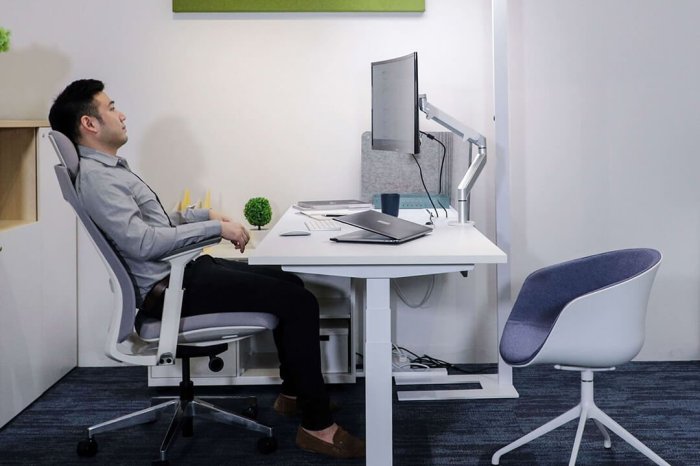
Your Foundation for Comfort
The chair is the cornerstone of an ergonomic workspace. Look for chairs that offer:
- Adjustable Height: Allows you to position your feet flat on the floor with your thighs parallel to the ground.
- Lumbar Support: Provides crucial support for the lower back, preventing slouching and strain.
- Adjustable Armrests: Should allow for proper arm positioning and reduce shoulder tension. Consider adjustable armrests that can be removed entirely for those who prefer a different working style.
- Headrest (Optional but Beneficial): Offers neck support, especially for those who spend long hours working at their computers.
- Breathable Fabric: Keeps you cool and comfortable, preventing excessive sweating.
Consider chairs with features like adjustable tilt tension, allowing you to customize the chair’s recline to your preference. Popular brands known for their ergonomic chairs include Herman Miller, Steelcase, and Haworth.
2. The Standing Desk
Promoting Movement and Activity
Sitting for prolonged periods is detrimental to health. A standing desk, or even a sit-stand desk converter, encourages movement and helps combat the negative effects of prolonged sitting. Features to look for include:
- Height Adjustability: Allows you to easily switch between sitting and standing positions.
- Stability: Ensure the desk is sturdy and doesn’t wobble when in use.
- Sufficient Work Surface Area: Provides enough space for your computer, keyboard, and other work essentials.
Remember to use an anti-fatigue mat with a standing desk to provide cushioning and support for your feet and legs.
3. The Ergonomic Keyboard and Mouse
Preventing RSI
Repetitive strain injuries are common among office workers. Ergonomic keyboards and mice are designed to promote a more natural hand and wrist position, reducing strain and discomfort. Key features include:
- Split Keyboards: Allow for a more natural hand position, reducing wrist twisting.
- Vertical Mice: Encourage a more natural hand position, reducing wrist strain.
- Adjustable Key Height and Angle: Allows for customization to suit individual needs.
Brands like Microsoft, Logitech, and Kinesis are known for their ergonomic keyboard and mouse options.
4. Monitor Placement and Accessories
Optimizing Your Visual Setup
Proper monitor placement is crucial for eye health and posture. Consider these factors:
- Monitor Arm: Allows for adjustment of monitor height and angle, reducing neck strain.
- Monitor Distance: The top of the monitor should be at or slightly below eye level.
- Proper Lighting: Avoid glare on the screen and ensure adequate ambient lighting.
5. Document Holders and Accessories
Supporting Good Posture
Using a document holder keeps documents at eye level, reducing the need to constantly bend your neck. Other useful accessories include:
- Footrest: Provides support for your feet if your chair doesn’t allow for proper foot placement.
- Wrist Rests: Offer additional support for your wrists while typing.
Choosing the Right Ergonomic Furniture for Your Needs
Selecting the right ergonomic furniture depends on individual needs and preferences. Consider factors such as:
- Your Budget: Ergonomic furniture can range in price from affordable to high-end.
- Your Workspace Size: Choose furniture that fits comfortably within your available space.
- Your Body Type and Posture: Consider your height, weight, and any existing postural issues.
- Your Work Style: Do you prefer sitting, standing, or a combination of both?
Maintaining Good Posture and Habits
Even with the best ergonomic furniture, maintaining good posture and habits is crucial. Remember to:
- Take Regular Breaks: Get up and move around every 30-60 minutes.
- Stretch Regularly: Simple stretches can help alleviate muscle tension.
- Adjust Your Setup Regularly: Your needs may change over time, so regularly adjust your furniture to ensure optimal comfort and support.
Frequently Asked Questions (FAQ)
- Q: How much should I spend on ergonomic office furniture? A: The cost varies greatly depending on the specific items and brands. You can find affordable options, but investing in higher-quality furniture may be worth it in the long run for better comfort and durability.
- Q: What are the most important ergonomic considerations for remote workers? A: Prioritizing proper chair support, monitor placement, and keyboard/mouse ergonomics are key. Also, incorporating movement and regular breaks is vital.
- Q: Can I make my existing workspace more ergonomic without buying new furniture? A: Yes, you can improve your workspace by adjusting your monitor height, using pillows for lumbar support, and taking regular breaks. However, investing in ergonomic furniture will provide more significant and lasting benefits.
- Q: Are ergonomic chairs worth the investment? A: Absolutely! A good ergonomic chair can prevent pain, improve posture, and increase productivity, making it a worthwhile investment for your long-term health and well-being.
- Q: Where can I find more information on ergonomics? A: The website of the Occupational Safety and Health Administration (OSHA) and the Human Factors and Ergonomics Society (HFES) offer valuable resources.
Conclusion: Ergonomic Office Furniture For Remote Work
Investing in ergonomic office furniture is a crucial step towards creating a healthy and productive remote work environment. By prioritizing comfort, support, and proper posture, you can significantly reduce your risk of work-related injuries and maintain a higher level of well-being. Don’t underestimate the importance of your physical health – your body will thank you for it!
Call to Action
Ready to upgrade your home office and prioritize your well-being? Browse our selection of high-quality ergonomic office furniture today and experience the difference!
FAQ Explained
What is the most important piece of ergonomic furniture?

An ergonomic chair that provides proper lumbar support is arguably the most crucial piece, as it directly impacts posture and spinal health.
How often should I adjust my ergonomic setup?
Regular adjustments are key. Make minor tweaks throughout the day as needed to maintain comfort and proper posture. A more thorough assessment and adjustment should be done at least every few months or whenever you notice discomfort.
What if I have limited space for a home office?
Space-saving solutions exist! Consider adjustable height desks, compact chairs, and wall-mounted monitor arms to maximize your limited area.